Introduction
Are you a recent graduate preparing to apply for jobs and internships? It can feel overwhelming. Many freshers have strong technical foundations and good project work, yet their resumes don't always communicate that experience clearly.
In 2026, many employers use a combination of recruiting software and human review when processing applications. That makes clear, well-structured resume content especially useful.
This guide shows you how to build a practical, ATS-friendly resume as a fresher, from choosing the right structure to writing stronger project descriptions and tailoring relevant terminology for each application. The advice is informed by practical software-industry experience, common resume-review situations, and observations from working with job seekers and professionals involved in hiring.
You'll find a ready-to-use resume structure, examples you can adapt, and straightforward checks you can complete before submitting an application.
Important: The sample resume and examples in this guide are illustrative. Replace the names, projects, metrics, certifications, and other details with your own genuine information.
Why ATS-Friendly Resumes Matter
Many employers use Applicant Tracking Systems (ATS) to collect, organize, search, and process job applications. Depending on the system and how the employer uses it, an ATS may extract information such as job titles, skills, education, dates, and other qualifications from your resume.
This is why a simple resume structure is usually a safer choice. Clear section headings, readable text, consistent dates, and relevant keywords make your information easier for both software and people to understand.
Complicated layouts can introduce unnecessary risk. Tables, multiple columns, text boxes, graphics, icons, and image-based text may not be interpreted consistently by every resume-processing system. That doesn't mean every ATS will fail to read them, but there is little benefit in adding complexity when a simpler layout can communicate the same information.
A good fresher resume therefore has two audiences: the software that may process it and the recruiter or hiring manager who ultimately evaluates the application.
The goal isn't to create a resume that tries to trick an ATS. The goal is to create a clear, well-structured document that communicates your qualifications accurately to both systems and people.
ResumeInator Tip: ATS compatibility and recruiter readability don't need to be treated as separate goals. In many cases, a simple, well-organized resume helps both.
Free 2026 ATS-Friendly Resume Template
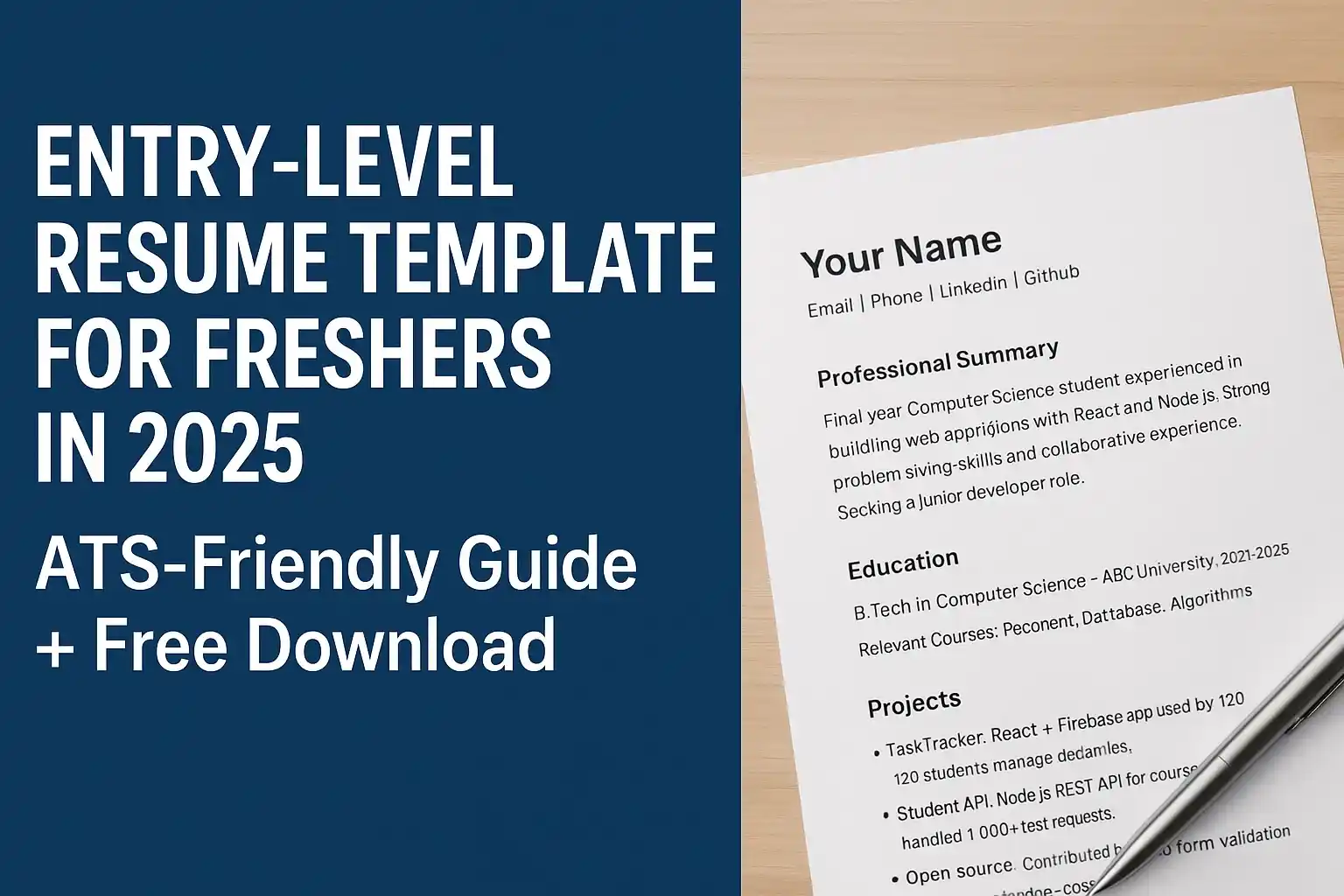
Below is a practical one-page layout you can use as a reference when creating a fresher resume. It keeps the structure simple while making important information easy to find and customize for different roles.
Explore Free ATS-Friendly Resume Templates & Download on ResumeInator
Sample template: The name, university, projects, metrics, certifications, and achievements below are fictional examples for demonstration. Replace them with your own genuine information and verifiable results.
Your Name
Email | Phone | LinkedIn | GitHub

Professional Summary
Final year Computer Science student with hands-on experience building web applications with React and Node.js through academic and personal projects. Strong problem-solving foundation and collaborative experience. Seeking a junior developer role.

Education
B.Tech in Computer Science — ABC University, 2022-2026
Relevant Courses: Web Development, Database Systems, Algorithms

Projects
- TaskTracker: React + Firebase application used by 120 students
  to manage deadlines and tasks.
- Student API: Node.js REST API for course enrollments,
  handling 1,000+ test requests.
- Open-source: Contributed fixes to a form validation library,
  improving edge-case handling.

Skills
Technical: JavaScript, React, Node.js, SQL, Git, REST APIs
Soft: Communication, Teamwork, Time Management

Certifications
- Full Stack Web Development Certificate (2024)

Additional Experience
- Volunteer tutor for coding workshops
The examples above are deliberately specific so you can see how a resume can communicate skills, projects, and results. The numbers are only examples—never copy them unless they genuinely describe your own work.
How to Write Each Section Effectively
Professional Summary
Think of this as a short introduction to your professional profile. Depending on your background, mention your degree or relevant background, strongest skills, practical experience such as projects or internships, and the type of role you're targeting.
For example:
Final-year Computer Science student with hands-on experience building React and Node.js applications through academic and personal projects. Seeking an entry-level frontend or full-stack development role.
Your summary doesn't need to contain every skill you know. Highlight the abilities most relevant to the position and support them elsewhere in the resume.
If you want more examples, see our resume summary examples for freshers for practical examples you can adapt to different roles.
Projects
Projects are especially important for freshers because they give you a way to demonstrate what you can actually build or solve when you don't have several years of professional experience.
For each important project, try to answer three questions: What did you build? What did you use? What did you accomplish?
For example, instead of writing:
Weak: "Created a website using React."
You could write:
Better: "Built a responsive task-management web application using React and Firebase, including authentication, task creation, filtering, and real-time data updates."
The second version gives the reader a much clearer picture of your contribution and the technologies involved. If you have a genuine measurable result, add it. If you don't have one, describe the functionality or technical challenge instead of inventing a number.
If your project is deployed online and you have genuine numbers, use them. For example, you might mention the number of users who actually used your project, the number of test cases you created, the response-time improvement you measured, or the amount of data you processed.
If you don't have professional work experience yet, our guide to writing a resume with no experience explains how to use projects, education, internships, certifications, and other relevant experience effectively.
For additional project ideas, you can also explore our project ideas for freshers guide.
Skills
Group skills into technical and professional categories when that makes the section easier to read. Use consistent terminology that accurately describes your skills and, where appropriate, reflects the wording used in relevant job postings.
Don't change a technology name or add a skill simply to copy a requirement you don't genuinely meet.
For example, if you genuinely know React and have used REST APIs in your projects, you can list those skills clearly rather than hiding them behind vague phrases.
For a larger list of examples, see our guide to resume skills for freshers , including technical skills, soft skills, and tips for choosing the most relevant ones for a job.
Education and Certifications
Keep your degree, institution, and graduation year clear and easy to find. Add selected courses, certifications, or academic details when they are directly relevant to the role.
For example, a Computer Science student applying for a software role might include courses such as "Data Structures," "Database Systems," or "Web Development" when those subjects support the position.
You don't need to list every course you've taken. Focus on information that helps explain your preparation for the role.
How to Use Resume Keywords as a Fresher
Resume keywords are most useful when they accurately describe skills, tools, qualifications, or responsibilities that are relevant to the job you're applying for.
Start with the job description. If a frontend developer position repeatedly mentions React, JavaScript, REST APIs, Git, and responsive design, check whether those skills genuinely appear in your projects, coursework, internships, or other experience.
For example, a generic Skills section might say:
Skills:
JavaScript, Web Development, Programming, Git
If the candidate genuinely has the relevant experience, a more specific version could be:
Skills:
JavaScript, React, REST APIs, Git, Responsive Design
The important point is that the second version should reflect the candidate's actual abilities. Don't copy every keyword from a job description simply to increase keyword density.
If you can't explain a technology or skill during an interview, it probably shouldn't be presented as one of your actual skills.
Relevant keywords can appear naturally in your summary, skills, projects, internships, and other sections where they accurately describe your experience.
How to Tailor Your Resume for Each Job
Tailoring your resume can make it more relevant to the position you're applying for without requiring you to rewrite the entire document.
Start by reading the job description and identifying several of the skills, responsibilities, qualifications, or phrases that appear most relevant to the position.
Then review your master resume and make thoughtful adjustments. For example, if the position emphasizes React and Redux and you genuinely have experience with both, make sure those skills are visible in the appropriate sections.
You can also reorder projects, adjust your summary, shorten less relevant bullets, or bring the most relevant experience closer to the top.
The important rule is simple: tailor your resume without changing the truth about your experience.
Use one master resume and create job-specific versions. Keep file names clear, for example:
John_Doe_Frontend_Resume.pdf
John_Doe_Backend_Resume.pdf
John_Doe_Data_Analyst_Resume.pdf
Clear filenames make it easier to identify which version you're submitting and reduce the chance of uploading the wrong document.
Common Mistakes Freshers Make
Even a strong academic background can be weakened by avoidable resume mistakes. Before submitting your application, check for problems such as:
- Using graphics or unnecessarily complicated layouts that can make the document harder to process or read.
- Putting important contact information in a header, footer, image, or text box instead of keeping it in the main document text.
- Using inconsistent date formats or unclear job and project titles.
- Sending the same resume to every employer without reviewing the job description.
- Submitting image-based PDFs or screenshots instead of a text-based document.
- Listing skills you have only briefly encountered and cannot confidently explain.
- Writing long paragraphs instead of concise, evidence-based bullet points.
- Including metrics that you cannot verify simply to make projects sound more impressive.
For a more detailed review of common resume problems, see our guide to the top 50 resume mistakes .
ResumeInator Tip: A short, accurate resume is stronger than a longer resume filled with claims you cannot support.
What Recruiters Usually Need to Find Quickly
A fresher resume doesn't need to tell your entire life story. The goal is to make the relevant information easy to find.
When reviewing an entry-level resume, a recruiter should be able to identify your target role, education, relevant skills, projects, internships, and contact information without digging through decorative elements or long paragraphs.
This is one reason simple formatting works so well. Instead of trying to make every section visually impressive, use clear headings and concise descriptions to make your strongest evidence easy to find.
Put your strongest and most relevant projects near the top when they are more useful than unrelated information. If you have an internship that directly matches the position, make sure it is easy to find. If a project demonstrates a skill mentioned in the job description, explain that connection clearly.
Remember that the exact review process differs between employers. This article is giving you a practical structure for presenting your qualifications clearly, not a guarantee of how every recruiter will evaluate a resume.
How ResumeInator Can Help
ResumeInator gives you a structured starting point for building and organizing a resume. You can choose a template, add your education, projects, skills, certifications, and other sections, and then review the finished document before submitting an application.
The goal isn't to make every resume look identical. It's to give you a clean starting point so you can focus on the information that actually represents your experience.
You can also use the ResumeInator ATS Resume Scanner to review your resume for common structural and content checks before applying.
Treat automated feedback as a review aid rather than a guarantee that a particular employer will shortlist you.
Before and After Resume Example
Here's a simple example of how a fresher can make a resume statement more specific without exaggerating their experience.
Before: "Computer Science graduate. Familiar with Java."
After: "Computer Science graduate with hands-on experience building Java-based academic projects. Developed a student management application using Java and SQL, with features for managing student records and course information."
The second version gives the recruiter more useful information: the candidate's education, practical experience, technology, and type of project.
Notice that it doesn't claim a user count, performance improvement, or other metric that the candidate cannot verify.
This principle applies throughout your resume: be as specific as possible, but only as specific as your real evidence allows.
Frequently Asked Questions
Why do freshers need an ATS-friendly resume?
Many employers use Applicant Tracking Systems to organize and process applications. An ATS-friendly structure helps your resume present its information clearly to the software and to the people reviewing the application.
Should I keep my fresher resume to one page?
A fresher resume is usually best kept concise and often fits comfortably on one page. However, one page is not a universal requirement. If you have enough relevant projects, internships, research, or other experience to justify additional space, use it rather than shrinking the content until it becomes difficult to read.
Should freshers include projects on their resumes?
Yes. Relevant academic, personal, open-source, and internship projects can provide useful evidence of your skills, especially when you have limited professional experience. Focus on what you built, what you used, and what you accomplished or learned.
Should I include a photo on my resume?
Follow the expectations of the country, industry, and employer. If a photo isn't requested or customary for the role, leaving it out generally keeps the resume focused on qualifications and avoids using valuable space for information that may not be relevant to the hiring decision.
Should I customize my resume for every job?
You don't necessarily need to rewrite the entire resume for every application, but reviewing and tailoring relevant sections such as your summary, skills, projects, and experience can make the document more closely aligned with the position.
Should freshers include soft skills?
Yes, when they are relevant to the role. Skills such as communication, teamwork, problem solving, and time management can be useful, but they are more convincing when supported by projects, internships, academic activities, volunteering, or other examples.
What file format should I use for my fresher resume?
Follow the employer's instructions whenever a specific format is requested. If no format is specified, a text-based PDF is often a practical choice because it can preserve the document's layout across different devices. Always review the final file before submitting it.
Final Tips and Checklist
- Keep a fresher resume concise and usually aim for one page unless your relevant experience genuinely requires additional space.
- Proofread carefully and ask someone else to review it when possible.
-
Name the file clearly, for example:
John-Doe-Resume.pdf. - Tailor relevant keywords and the professional summary for each application.
- Use consistent headings such as Education, Projects, Skills, and Certifications.
- Include only genuine skills, projects, achievements, and metrics.
- Check the final exported PDF rather than relying only on the editable document.
- Make sure your contact details and professional links are correct and accessible.
- Review the job description one final time before submitting the application.
Small improvements add up. Spending a few extra minutes reviewing your resume for relevance, accuracy, and clarity can make it easier for a recruiter to understand the connection between your background and the position.
Conclusion
A clear, ATS-friendly resume can make it easier for your qualifications to be identified during the application process, but no resume format can guarantee an interview. Your skills, experience, relevance to the role, candidate pool, and the employer's hiring process all matter.
Start with a simple structure, use clear headings, explain your projects with specific evidence, select relevant skills, and tailor the resume to the roles you're applying for.
If you use metrics, make sure they are genuine. If you list a technology, make sure you can explain it. If you describe an achievement, make sure the achievement is yours.
You can explore ResumeInator's free resume templates to build your resume, then review the finished document with the ATS Resume Scanner before submitting your application.
The goal isn't to create a perfect resume. It's to create an accurate, relevant, readable document that makes your real qualifications easier to understand.